Workspace
The Workspace pattern is a dashboard-style form that aggregates tiles, lists, charts, links, and Power BI content into a single role-based landing page. Workspaces provide an at-a-glance view of a functional area's key metrics and pending work items, giving users fast access to the actions and information they need most.
When to Use
- The form is a role-based dashboard or landing page for a functional area (e.g., accounts payable, warehouse management, procurement).
- The content includes a mix of KPI tiles, filtered lists, charts, and navigation links.
- Users need a personalised view of their daily tasks, exceptions, and metrics.
- The form does not display or edit a single record — it is an aggregation and navigation surface.
Variations
Workspace (Standard)
The standard full-page workspace with a panoramic horizontal layout. Sections scroll horizontally like a panorama.
Operational Workspace
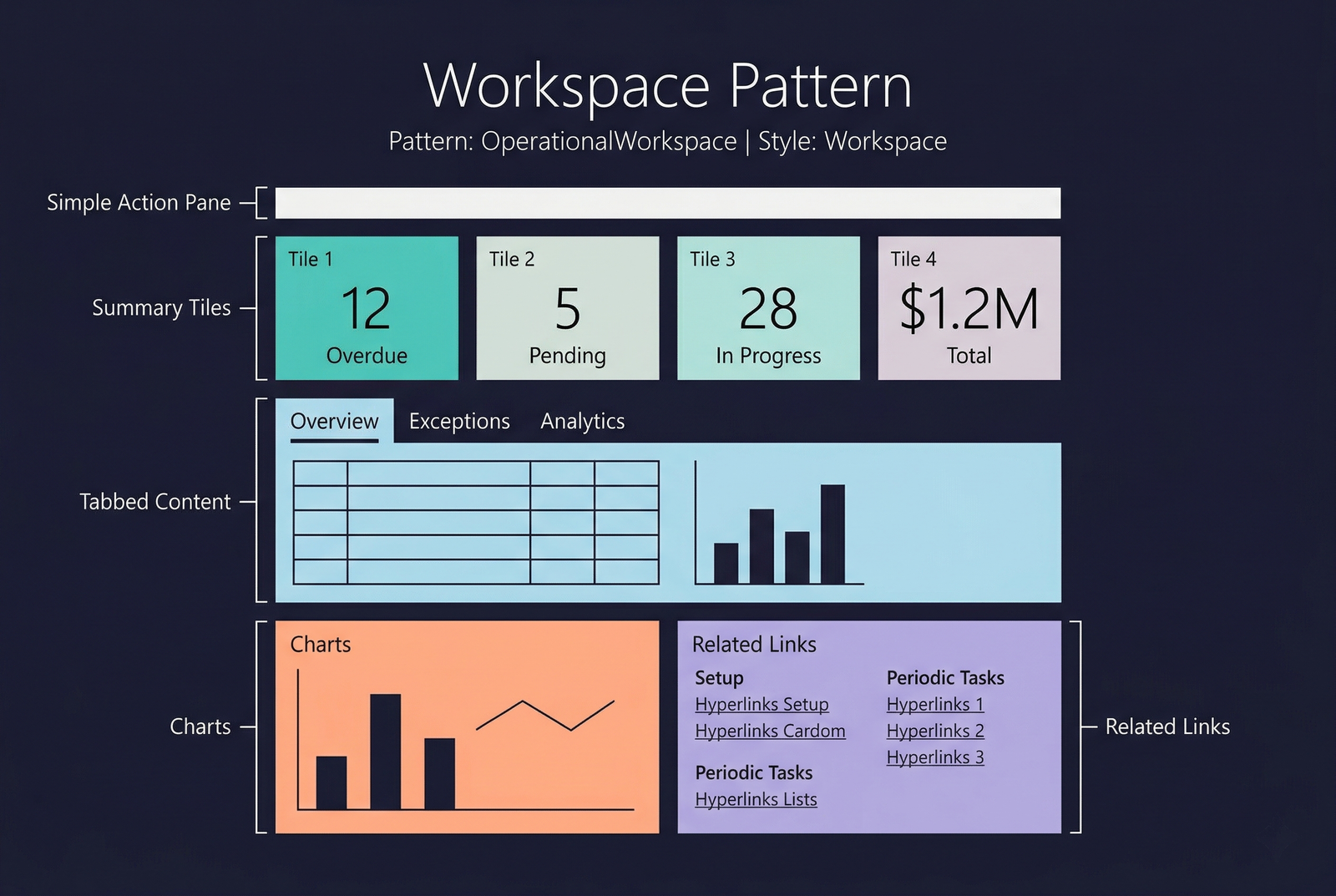
An enhanced variant that adds a full-width tab control at the top for filtering and additional structured content. It blends workspace tiles with a more data-dense, tabbed layout. This is the most common variant in modern D365 F&O.
Key differences from Standard:
- Includes a tab control with filter/list tabs.
- The content is arranged vertically rather than as a horizontal panorama.
- Better suited for power users who need both KPIs and filtered operational lists.
Standard Workspace
Operational Workspace
Key Components
| Component | Control Type | Required | Description |
|---|---|---|---|
| Action Pane | AxFormActionPaneControl | No | Minimal — typically just a gear icon for workspace configuration. |
| Summary Tiles | AxFormGroupControl (Section Tiles subpattern) | Yes | KPI tiles showing counts, amounts, or status indicators. Each tile is a AxFormButtonControl styled as a tile. |
| Tabbed Lists | AxFormTabControl (Section Tabbed List subpattern) | No | One or more filtered grids organised into tabs for different views of pending work. |
| Charts | AxFormGroupControl (Section Stacked Chart subpattern) | No | A chart control visualising trends, distributions, or comparisons. |
| Power BI Section | AxFormGroupControl (Section Power BI subpattern) | No | Embedded Power BI tiles or reports for advanced analytics. |
| Related Links | AxFormGroupControl (Section Related Links subpattern) | No | Hyperlinks to setup forms, reports, and periodic tasks. Organised in labelled groups. |
Example Forms in D365 F&O
| Form | Menu Item | Description |
|---|---|---|
VendInvoiceWorkspace | Accounts payable → Workspaces → Vendor invoice entry | The AP workspace showing overdue invoices, pending approvals, and invoice totals as tiles. Uses the Operational Workspace variant with tabbed lists. |
FMClerkWorkspace | Fleet Management → Workspaces → Fleet management (demo data) | A demonstration workspace with rental tiles, vehicle lists, and links. Useful for learning the workspace pattern structure. |
BankTreasurerWorkspace | Cash and bank management → Workspaces → Bank management | Treasury workspace with cash position tiles, bank account lists, and reconciliation links. |
ProcurementOrderWorkspace | Procurement → Workspaces → Purchase order preparation | Procurement workspace with order tiles, pending confirmations list, and approval workflows. |
Infographic Placeholder