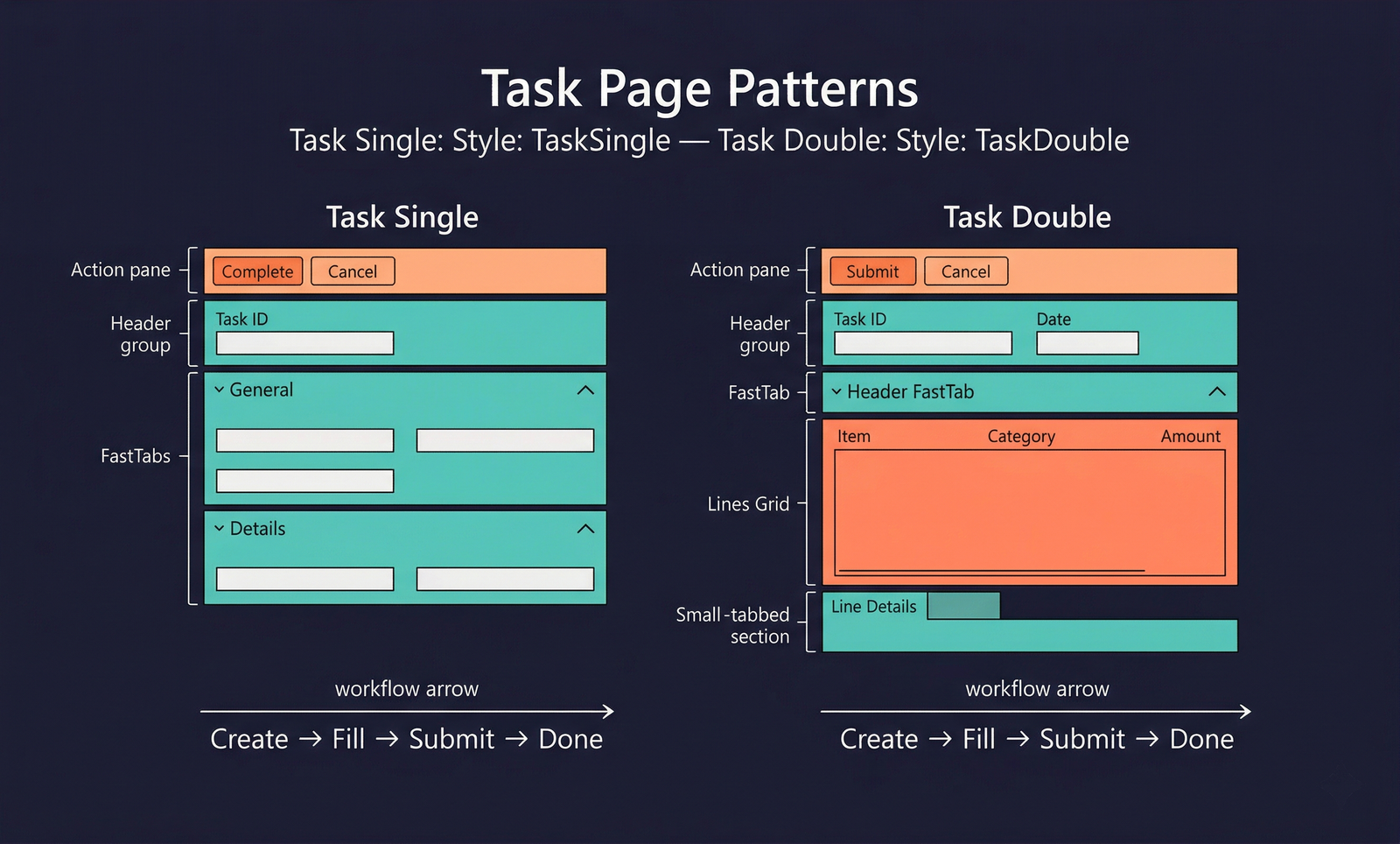
Task Pages
The Task Single and Task Double patterns are activity-oriented forms designed for focused data entry. They guide the user through entering data for a specific task — such as creating a journal entry, filling in an expense report, or recording a production order — with a streamlined layout that minimises distractions.
Task pages are simpler and more focused than Details Master or Details Transaction forms. They are suited for scenarios where a user creates or processes a record in a single sitting and then moves on.
Task Single
When to Use
- The form captures data for a single entity (one data source) in a task-oriented flow.
- There is no header/lines relationship — all fields belong to one record.
- The form is opened to create or process a specific item, then closed.
- The layout should be streamlined with minimal navigation overhead.
Task Double
When to Use
- The form has a header/lines structure similar to a transaction, but the emphasis is on task completion rather than ongoing document management.
- The user is entering a batch of related line items under a single header (e.g., a counting journal, expense report, or timesheet).
- After completing the data entry, the user submits or processes the batch and closes the form.
- The form should feel lighter than a full Details Transaction pattern.
Key Components
| Component | Control Type | Pattern | Required | Description |
|---|---|---|---|---|
| Action Pane | AxFormActionPaneControl | Both | Yes | A streamlined action pane focused on the task workflow (Submit, Complete, Cancel). |
| Header Group | AxFormGroupControl | Both | Yes (Double), Optional (Single) | Identifies the task being worked on. |
| FastTabs | AxFormTabControl | Both | Yes | Collapsible sections for field groups. |
| Lines Grid | AxFormGridControl | Double only | Yes | The data-entry grid for line items. |
| Lines Toolbar | AxFormGroupControl | Double only | No | Optional action bar above the lines grid. |
| Line Details | AxFormTabControl | Double only | No | Extended detail for the selected line. |
Example Forms in D365 F&O
| Form | Pattern | Menu Item | Description |
|---|---|---|---|
TrvExpenseReport | Task Double | Expense management → My expenses → Expense reports | Expense report entry. Header contains employee, purpose, and dates; lines contain individual expense entries with category, amount, and receipts. |
TSTimesheetEntry | Task Double | Project management → Timesheets → All timesheets | Timesheet entry. Header identifies the worker and period; lines capture hours per project/activity. |
InventJournalCount | Task Double | Inventory management → Journal entries → Item counting | Counting journal. Header identifies the journal; lines list items and counted quantities. |
ProdTableCreate | Task Single | Production control → Production orders → All production orders → New | Production order creation task. A focused form for entering the item, quantity, and scheduling parameters of a new production order. |
Task Pages vs. Details Transaction
| Aspect | Task Page | Details Transaction |
|---|---|---|
| Purpose | Complete a task and close | Ongoing document management |
| Lifecycle | Create → Fill → Submit → Close | Create → Edit → Post → Review |
| Navigation list | No — user works on one task | Typically has a navigation list for switching between documents |
| Complexity | Streamlined, fewer FastTabs | Full-featured, many FastTabs and detail panels |
Infographic Placeholder