Forms
A Form in the Application Object Tree (AOT) is the primary user-interface object in Dynamics 365 Finance & Operations. Every screen — list pages, detail forms, dialogs, drop-dialogs, lookups, and workspaces — is implemented as a form. A form binds to one or more data sources (tables, views, or queries), arranges controls in a visual design tree, and contains X++ methods that respond to user actions and framework lifecycle events.
At runtime, the kernel instantiates a FormRun object to manage the form. FormRun orchestrates the entire lifecycle: initialising data sources, building the control tree, executing queries, handling user interaction, and tearing the form down when it closes. Understanding this lifecycle is essential for writing correct, performant customisations.
Data Sources
A form can reference three types of AOT objects as its underlying data:
| Source Type | Description |
|---|---|
| Table | The most common data source. The form builds an internal query from the table and any joined data sources. Records can be created, read, updated, and deleted directly through the form. |
| View | A read-only virtual table backed by a SQL CREATE VIEW statement. Use a view as a data source when the form needs to display pre-joined, filtered, or aggregated data that does not require direct editing. |
| Query | An AOT query object can be assigned to the form's DataSourceQuery property or to individual data sources. When a query is specified, the form uses it instead of auto-generating one from the data source table hierarchy. |
When multiple data sources are present, the framework automatically determines the join relationships between them based on the relations defined at the table level. The JoinSource and LinkType properties on each data source control which parent data source it joins to and the type of join (InnerJoin, OuterJoin, ExistJoin, etc.). See Data Sources for a full property reference.
The auto-generated query can be inspected and modified at runtime through the FormRun class and data source methods. This is commonly done in init() or executeQuery() to add dynamic ranges, change sort orders, or alter join conditions.
The FormRun Lifecycle
When a form is opened, the kernel creates a FormRun instance and executes a precise sequence of methods. These methods fire on the form itself, on each data source, and on individual controls. Understanding the order is critical for placing custom logic in the correct location.
The following diagram shows the lifecycle phases: form open, record navigation, record save, and form close.
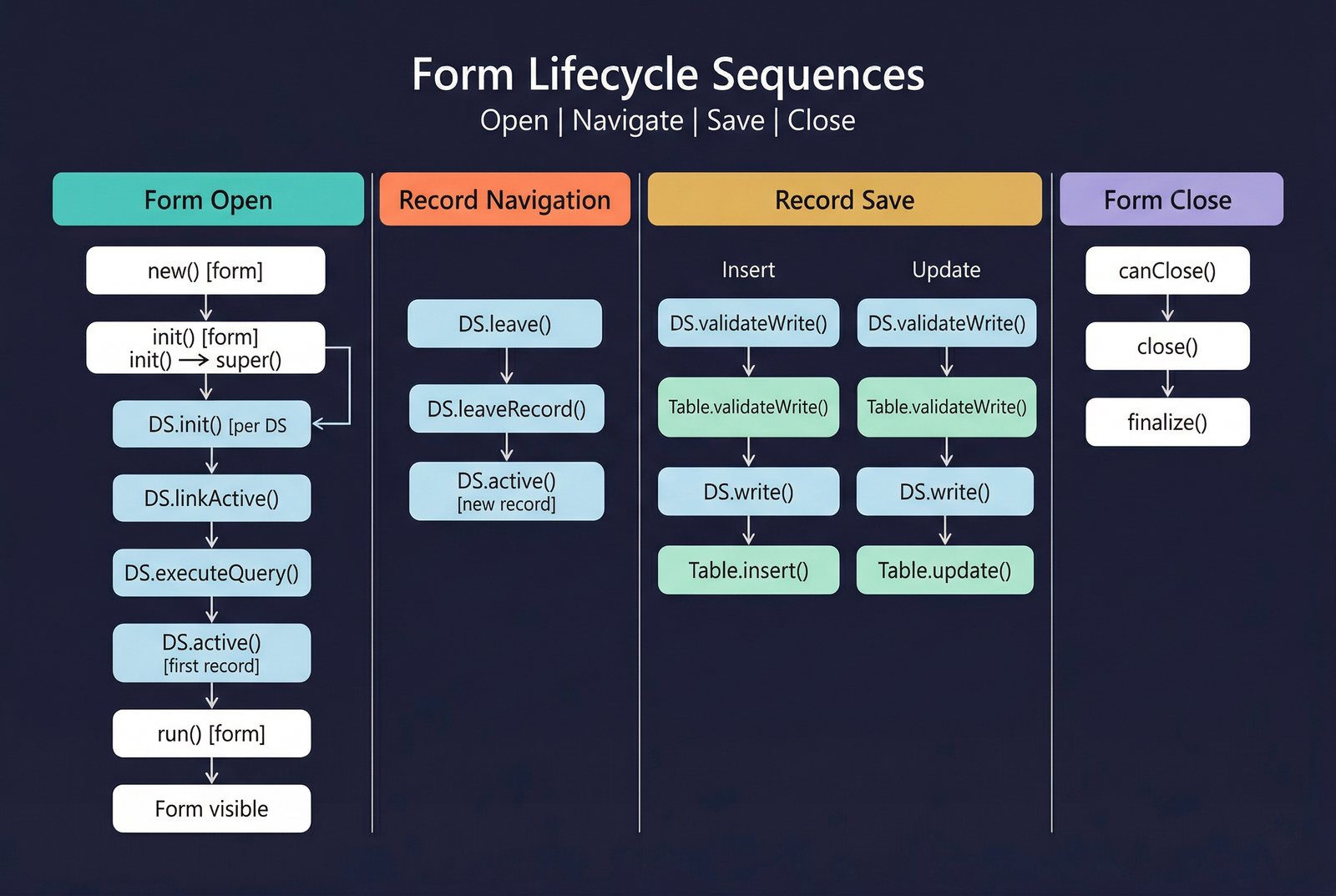
Form-Level Methods
| Method | Description |
|---|---|
new() | Constructor. Rarely overridden. The kernel passes an Args object with context about how the form was invoked. |
init() | Primary initialisation method — the most commonly overridden form method. super() triggers data source init() methods and builds the control tree. Place pre-query logic before super(), post-init logic after. |
run() | Called after init(). super() makes the form visible and triggers executeQuery() on any data sources not yet queried. |
canClose() | Called when the form is about to close. Return false to prevent closing (e.g., prompt for unsaved changes). |
close() | Called after canClose() returns true. Perform final cleanup; super() destroys the form. |
finalize() | Last method called. Releases all object references. Rarely overridden. |
Data Source Methods
| Method | Description |
|---|---|
DS.init() | Called per data source during init() → super(). Initialises the query object. Override to modify query structure at startup. |
DS.executeQuery() | Sends the query to the database. The recommended entry point for dynamic filtering — modify ranges before calling super(). |
DS.active() | Called when the current record changes. Override to enable/disable controls based on the current record's values. |
DS.linkActive() | Called on child data sources when the parent's active record changes. Re-queries the child data source. |
DS.leave() | Called when focus is about to leave the current record. Return false to prevent navigation. |
DS.leaveRecord() | Called after leave() succeeds. Triggers validateWrite() and write() if the record was modified. |
DS.create() | Called when a new record is about to be created. |
DS.initValue() | Called on the table buffer after create() to set default field values. |
DS.write() | Saves the record — delegates to Table.insert() or Table.update(). |
DS.validateWrite() | Called before write(). Return false to prevent the save. |
DS.delete() | Called when the user deletes a record. |
DS.validateDelete() | Called before delete(). Return false to cancel the deletion. |
DS.init()— modify the query structure once at form startup (add permanent ranges, extra data sources).DS.executeQuery()— modify ranges dynamically each time data is refreshed (respond to user filter changes).Form.init()(before super) — adjust data source properties or the query before any data source is initialised.
For code examples demonstrating these methods, see Code Examples.
Args and Context Passing
Forms are almost always opened via menu items (Display, Output, or Action). The kernel constructs an Args object and passes it to the form's new() and init() methods. Args carries context about how and why the form was invoked.
Key Args Members
| Member | Type | Purpose |
|---|---|---|
menuItemName() | str | The name of the menu item that opened the form. Use this to determine which entry point was used when the same form is opened from multiple menu items. |
menuItemType() | MenuItemType | The type of menu item: Display, Output, or Action. |
record() | Common | A table buffer passed as a calling record. For example, when a form is opened from a grid row, the selected record is available here. |
caller() | Object | A reference to the calling object — typically the FormRun of the parent form. Used for callbacks and to refresh the caller after the child form closes. |
parm() | str | A general-purpose string parameter. Used for passing simple context values. |
parmEnum() | anytype | An enum value passed as context. |
parmEnumType() | int | The enum type ID for parmEnum(). |
parmObject() | Object | An arbitrary object reference. Use for passing complex data structures. |
Accessing Args in Form init()
The Args class provides context about the form's invocation — which menu item was used, which record was selected, and the calling form reference. For code demonstrating Args usage and programmatic form opening, see Code Examples.
The Args class is covered in detail on a dedicated page. This section provides the essentials needed for understanding form initialisation and context flow.
Form Templates
The FormTemplate property on the form object specifies a structural template that the form is based on. Templates define the expected control structure and influence the form's behaviour and validation in the Best Practice checker.
| Value | Name | Description |
|---|---|---|
| 0 | None | No template applied. The form uses a freeform design. |
| 1 | ListPage | A list-centric form showing records in a grid with an action pane. Designed for browsing and acting on a set of records. |
| 2 | DetailsPage | A detail-oriented form for viewing and editing a single record. Typically has header fields and line-level FastTabs. |
Form Styles (Design)
The Style property on the form's Design node determines the overall form behaviour and appearance. The style affects which controls the framework expects and how the form interacts with the navigation system.
| Value | Name | Description |
|---|---|---|
| 0 | Auto | The framework infers the style from the form's structure. |
| 1 | DetailsFormMaster | Master detail form for viewing/editing a single record with related sub-grids. |
| 2 | Dialog | A modal dialog box. Used for parameter input before an operation executes. |
| 3 | DropDialog | A lightweight dialog that drops down from a button. Used for quick inline parameter entry. |
| 4 | ListPage | A full-page grid for browsing records with filters and an action pane. |
| 5 | Lookup | A popup lookup grid bound to a field. |
| 6 | SimpleList | A single-grid form for editing flat reference data (e.g., setup tables). |
| 7 | SimpleListDetails | A list on the left with detail fields on the right. |
| 8 | FormPart | A sub-form embedded as a FactBox or part within a parent form. |
| 9 | DetailsFormTransaction | A detail form for transactional documents with header/line structure. |
| 10 | TableOfContents | A form with a tree navigation pane (e.g., parameter forms). |
| 11 | Dashboard | A dashboard-style form displaying tiles and parts. |
| 12 | EntityPage | An entity page used in the web client. |
| 13 | Sitemap | Sitemap navigation form. |
| 14 | Workspace | A workspace aggregating tiles, lists, and links for a functional area. |
| 15 | SimpleDetails | A simple detail view without header/line separation. |
| 16 | TaskSingle | A guided task form with a single page of fields. |
| 17 | TaskDouble | A guided task form with two pages of fields. |
| 18 | Wizard | A multi-step wizard form. |
| 19 | Report | A report parameter dialog form. |
Form patterns (detailed in the Form Patterns section) work together with form styles. The pattern validator checks that the control tree matches the expected structure for the chosen style.
Properties
| Property | Display Name | Type | Description |
|---|---|---|---|
| Form PropertyAxForm | |||
| Name | Name | String | The name of the element. |
| Tags | Tags | String | Tags for this element separated by semicolon. |
| FormTemplate | Form Template | FormTemplate_ITxt | Specifies the template that the form is based on. Values: None (0), ListPage (1), DetailsPage (2). |
| DataSourceQuery | Data Source Query | String | Specifies the name of the query that provides data for the form. |
| DataSourceChangeGroupMode | Data Source Change Group Mode | ChangeGroupMode | Specifies whether or not to use a change group with the form. Values: None (0), ImplicitInnerOuter (1). |
| AllowPreLoading | AllowPreLoading | NoYes | Specifies whether a preloaded instance can be used when the associated FormRun instance is created. Values: No (0), Yes (1). |
| InteractionClass | Interaction Class | String | Specifies the name of the interaction class associated with the form. |