AOT Reference
The Application Object Tree (AOT) is the hierarchical structure that organises every metadata object in Dynamics 365 Finance & Operations. Every table, view, query, form, class, EDT, and enum — along with their properties, child elements, and relationships — is defined as an AOT object.
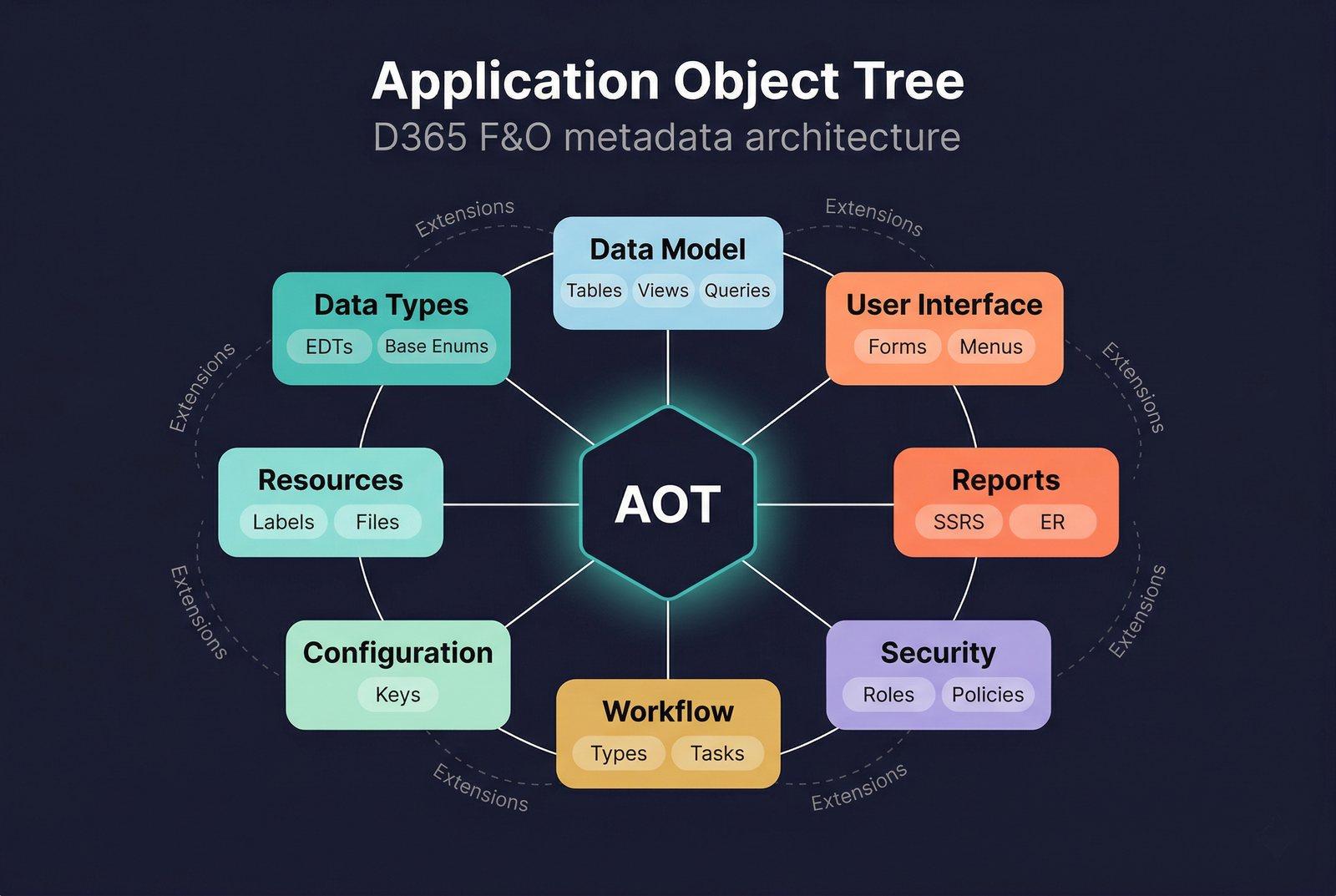
Data Types
The primitive building blocks of the data model. Extended Data Types (EDTs) and Base Enumerations define reusable, semantically meaningful types referenced by table fields, form controls, method parameters, and variables throughout the application.
| Page | Description |
|---|---|
| Extended Data Types | EDTs that extend primitive types with labels, help text, formatting, string sizes, and relations |
| Base Enums | Fixed lists of named symbolic constants backed by integer values |
| EDT Extensions | Modify existing EDTs — change string size, add relations, update labels |
| Base Enum Extensions | Add new values to existing base enumerations |
| Code Examples | X++ patterns for working with EDTs and enums |
Data Model
The objects that define how data is stored, queried, and consumed. Tables hold persistent data, views encapsulate query logic as virtual read-only tables, and queries define reusable data retrieval definitions.
| Page | Description |
|---|---|
| Tables | Database tables — fields, indexes, relations, field groups, and methods |
| Views | SQL views defined by queries, with bound and computed fields |
| Queries | Reusable query definitions with data sources, ranges, joins, and ordering |
| Table Extensions | Extend tables — add fields, indexes, relations, and event handlers |
| View Extensions | Extend views — add fields, modify data sources |
| Query Extensions | Extend queries — add data sources and ranges |
User Interface
The objects that present data to users and capture interaction. Forms are the primary UI surface, binding data sources to visual controls and responding to lifecycle events.
| Page | Description |
|---|---|
| Forms | The primary UI object — data sources, design tree, lifecycle, and Args |
| Form Patterns | 14 standard form patterns (Details Master, List Page, Dialog, etc.) |
| Menus | Navigational groupings that define the module navigation pane |
| Menu Items | Display, Action, and Output items that open forms, run classes, and launch reports |
| Form Extensions | Extend forms — add controls, data sources, and event handlers |
| Menu Extensions | Add menu items and sub-menus to existing menus |
Reports
Two reporting frameworks: SSRS for paginated business documents and Electronic Reporting (ER) for configurable data file generation.
| Page | Description |
|---|---|
| SSRS Reporting | AOT report objects — data sets, parameters, designs, and the RDP model |
| SSRS Data Sources | Data sets, fields, parameters, and external data sources |
| SSRS Design | Auto Design and Precision Design layouts, data regions, and drill-through |
| Electronic Reporting | Model-mapping-format framework for regulatory filings and data exchange |
Security
The role-based access control (RBAC) framework that governs what users can see and do.
| Page | Description |
|---|---|
| Roles | Top-level assignment units that aggregate duties, privileges, and sub-roles |
| Duties | Business responsibilities that group related privileges |
| Privileges | Atomic permissions granting access levels to entry points and data entities |
| Policies | XDS row-level security filters that restrict record visibility |
| Role Extensions | Add duties and privileges to existing roles |
| Duty Extensions | Add privileges to existing duties |
Business Process & Workflow
The workflow framework automates business processes by routing documents through configurable approval and task sequences.
| Page | Description |
|---|---|
| Workflow Types | Top-level templates — elements, line-item workflows, and document associations |
| Workflow Approvals | Approval steps with built-in outcomes (Approve, Deny, Reject, Request Change) |
| Workflow Tasks | Manual work items with custom outcomes |
| Workflow Automated Tasks | Code-executed tasks that run without user intervention |
| Workflow Categories | Module assignments that group workflow types |
| Providers | Participant, hierarchy, queue, and due-date resolution providers |
| Workflow Type Extensions | Extend workflow types |
| Workflow Task Extensions | Extend workflow tasks — add outcomes and modify properties |
| Workflow Approval Extensions | Extend workflow approvals — modify outcome event handlers |
Configuration, Labels & Resources
| Page | Description |
|---|---|
| Configuration | Configuration keys and groups that control feature availability at the schema level |
| Label Files | Translatable UI strings referenced by label IDs (e.g., @SYS12345) |
| Resources | Embedded binary and text assets — images, templates, XSLT, XML |
| References | External .NET assembly dependencies for X++ interop |