Base Enums
A Base Enumeration (base enum) is an AOT object that defines a fixed list of named symbolic constants backed by integer values. Base enums are the primary mechanism in D365 F&O for representing a closed set of options — statuses, types, categories, modes, and similar classifications.
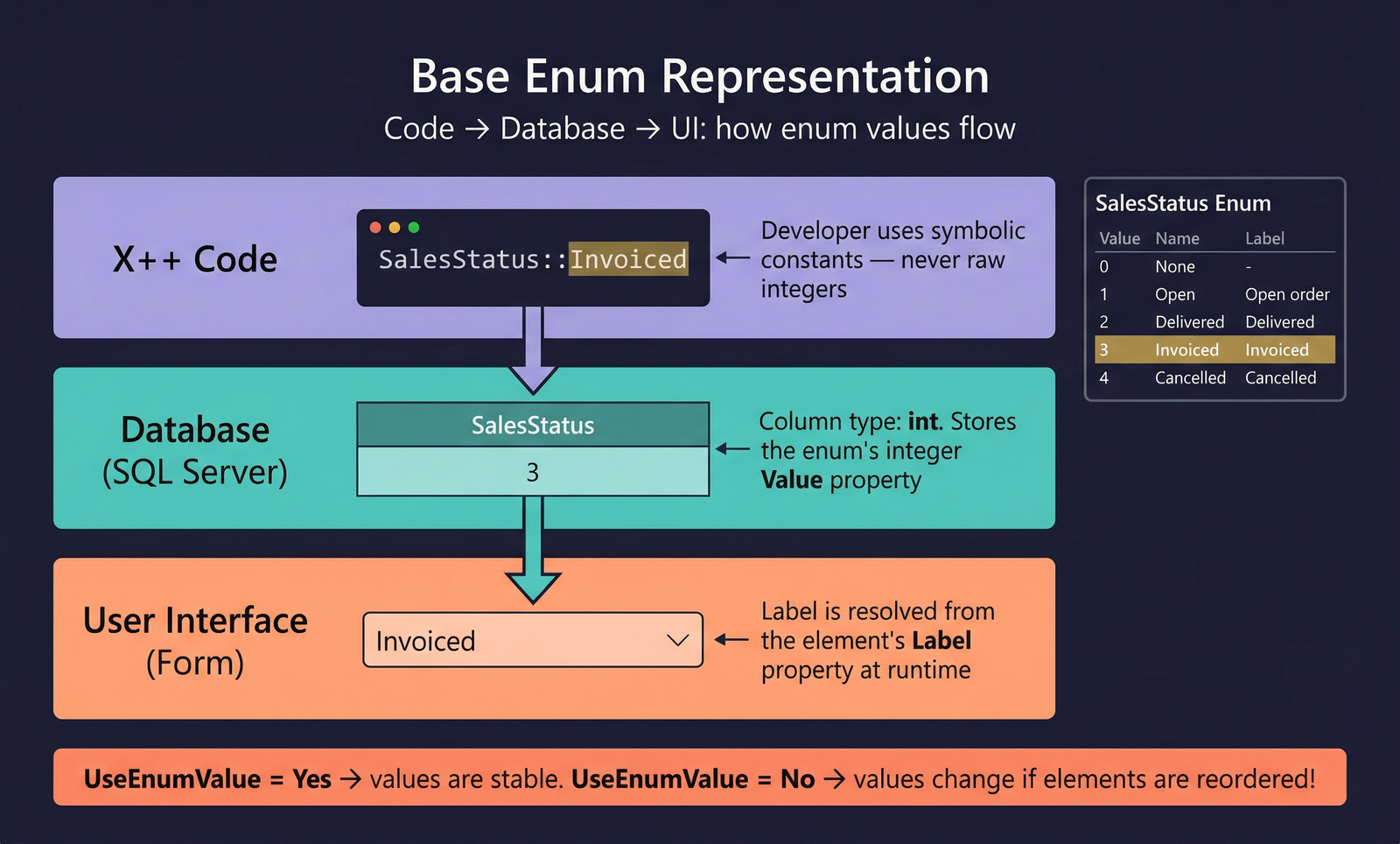
When a table field or EDT references a base enum, the runtime stores the integer value in the database column (SQL type int) but presents the label of the selected element to the user on forms and reports. This separation between stored value and display text is fundamental to how enums work.
Defining a Base Enum
To create a base enum in Visual Studio:
- Right-click your project → Add → New Item → Base Enum.
- Set the Name property (PascalCase, e.g.,
SAMOSalesStatus,SAMOVendInvoiceType). - Add elements by right-clicking the enum → New Element.
- Set the Label on each element (use a label reference such as
@SYS12345for translatable text).
See Code Examples for usage patterns in X++.
Elements, Labels, and Values
Each element in a base enum has three key attributes:
- Name — the symbolic constant used in X++ code (e.g.,
Open,Invoiced,Cancelled). - Label — the translated text shown to users on forms and reports. Always use a label ID (
@SYS...or@MyModule:...) so the text is translatable. - Value — the integer stored in the database.
How Values Are Assigned
The UseEnumValue property on the base enum controls value assignment:
- UseEnumValue = No (default) — the runtime auto-assigns values starting from 0 in the order elements appear. Adding or reordering elements changes values, which can corrupt existing data.
- UseEnumValue = Yes — each element has an explicit
Valueproperty that you set manually. This is the recommended approach. Values remain stable regardless of element ordering.
Always set UseEnumValue = Yes on new base enums and assign explicit integer values. Auto-generated values are fragile — reordering elements or adding elements in the middle changes the stored integers, causing data corruption in existing records.
Database Storage
The database column for an enum field is always SQL type int. The integer value of the selected element is what gets persisted. When querying in X++, always compare against the symbolic constant, never a raw integer — see Code Examples for the correct pattern.
IsExtensible
The IsExtensible property controls whether other models (ISV or customer code) can add new elements to the base enum via extensions.
- IsExtensible = true — other models can create an enum extension to append new elements. This is the standard approach for enums that partners or customers may need to extend (e.g., adding a new status value or transaction type).
- IsExtensible = false — no extensions are permitted. The enum is sealed. This is appropriate for enums where the set of values is fixed by design and adding values would break logic (e.g.,
NoYes, which must have exactly two values).
When an enum is extensible, consuming code should handle unknown values gracefully — typically by using a default case in switch statements that throws an error or logs a warning. See Code Examples for the pattern.
Microsoft best practice: set IsExtensible = true on all new enums unless there is a specific reason to seal them. This supports the extension model that replaced overlayering in D365 F&O.
Properties
The following table lists all properties available on a base enum (from AxEnum).
| Property | Display Name | Type | Description |
|---|---|---|---|
| Base Enum Properties | |||
| Name | Name | String | The name of the element. |
| Label | Label | String | Heading that the user will see in a list of options. Use a label ID for translations. |
| Help | Help | String | The help text to be shown in the status line. |
| HelpText | Help Text | String | Descriptive help text visible to users browsing the model via Reporting tools. Read-only. |
| IsExtensible | Is Extensible | Boolean | Whether the enum supports extension. When true, other models can add new values via enum extensions. |
| UseEnumValue | Use Enum Value | NoYes | Whether to use explicit value properties on elements. No = auto-generate values; Yes = use manually assigned values. Values: No (0), Yes (1). |
| Style | Style | EnumStyle_ITxt | Display style for the enum on forms. Values: ComboBox (0), RadioButton (1). |
| DisplayLength | Display Length | Int32 | Length of the display field, in number of characters. |
| ConfigurationKey | Configuration Key | String | The configuration key assigned to the item. Controls visibility based on licence configuration. |
| CountryRegionCodes | Country Region Codes | String | Comma-separated list of country/region codes where this enum is shown. |
| AnalysisUsage | Analysis Usage | AnalysisUsage | Determines how the field is used during cube generation. Values: Auto (0), None (1), Attribute (2), Measure (3), Both (4). |
| Literals | Literals | SqlLiteralMode_ITxt | Specifies how literals are represented in SQL statements. Values: Default (0), ForceLiterals (1), ForcePlaceholders (2). |
| IsObsolete | Is Obsolete | NoYes | Whether the element is deprecated. Values: No (0), Yes (1). |
| Visibility | Visibility | CompilerVisibility | Compiler visibility level. Values: Private (0), Protected (1), Public (2), Internal (3), InternalProtected (4). |
| Tags | Tags | String | Tags for this element, separated by semicolons. |
| Enum Value (Element) Properties | |||
| Name | Name | String | The symbolic name of the element (e.g., Open, Closed). Used in X++ code. |
| Label | Label | String | Descriptive label for the element, visible to users on forms and reports. |
| Value | Value | Int32 | The integer value stored in the database. Only editable when UseEnumValue = Yes on the parent enum. |
| ConfigurationKey | Configuration Key | String | Configuration key assigned to this element. Hides the element when the key is disabled. |
| CountryRegionCodes | Country Region Codes | String | Comma-separated list of country/region codes where this element is shown. |
| FeatureClass | Feature Class | String | The class implementing IFeature that determines the feature-flag state for this enum value. |
| Tags | Tags | String | Tags for this element, separated by semicolons. |