Tables
A Table in the AOT represents a database table in D365 F&O. Each table inherits from the Common system class, providing a standard interface for record manipulation, validation, and event handling. When a record is loaded from the database it is held in a table buffer whose fields map directly to the columns of the underlying SQL table.
Tables are the foundation of the data model — forms, data entities, views, queries, and reports all consume them.
Table Architecture Overview
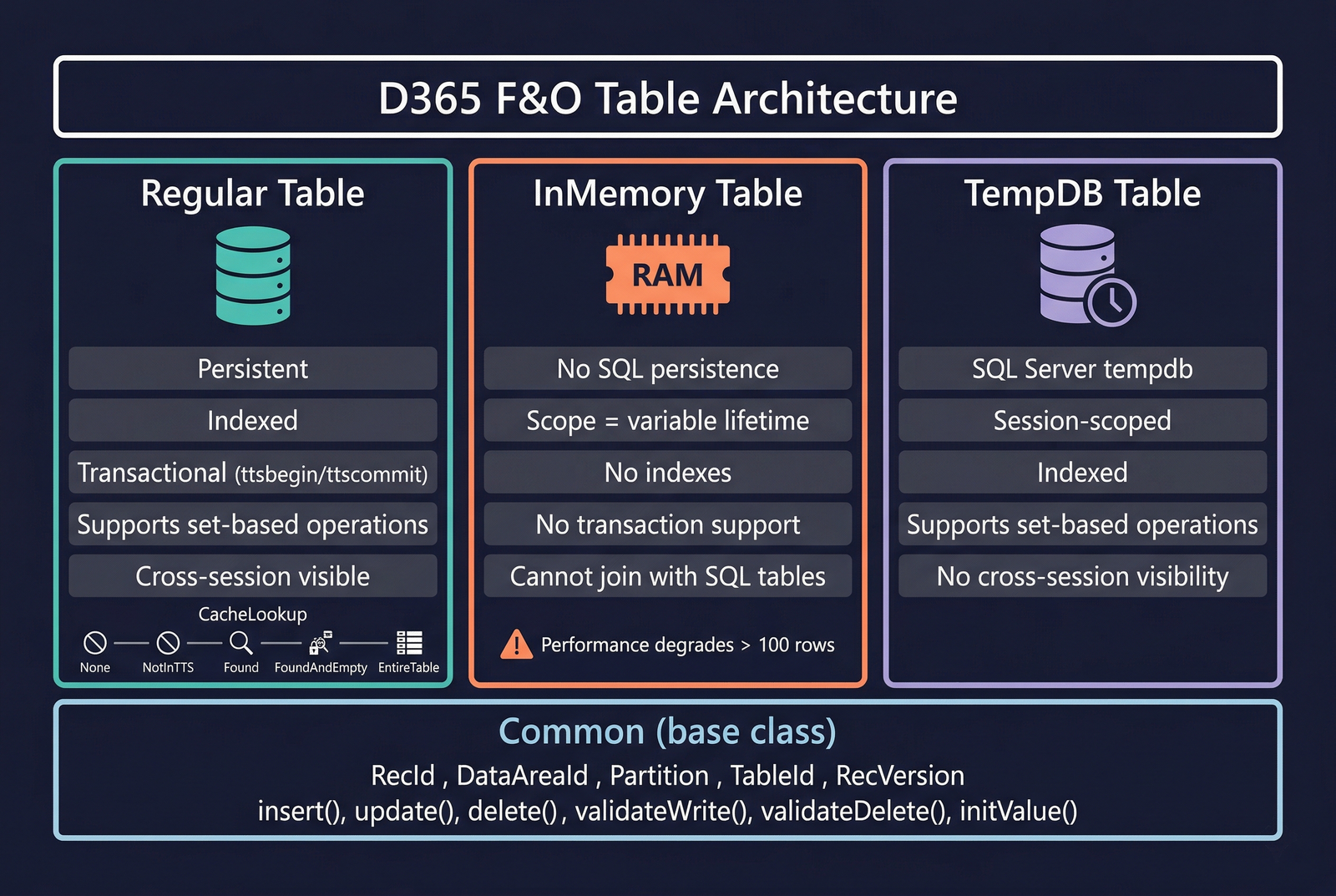
Inherited Methods from Common
Every table inherits from the Common class. These virtual methods are called by the runtime at specific points during the record lifecycle. Override them on individual tables to inject business logic. See Code Examples for implementation patterns.
Data Manipulation Methods
| Method | Description |
|---|---|
insert() | Called when a new record is written to the database. Override to add pre/post-insert logic. The super() call performs the actual SQL INSERT. |
update() | Called when an existing record is saved. The buffer must be selected with forupdate. Use orig() to compare old vs new values. |
delete() | Called when a record is removed. Override to clean up child records or enforce business rules. |
doInsert() | Executes the INSERT directly, bypassing the overridden insert(), all events, and database logging. |
doUpdate() | Executes the UPDATE directly, bypassing the overridden update(), all events, and database logging. |
doDelete() | Executes the DELETE directly, bypassing the overridden delete(), all events, and database logging. |
doInsert(), doUpdate(), and doDelete() skip all table-level business logic, events, database logging, and alert rules. Use only when the bypass is intentional (e.g., data migration, bulk data fixes).
Initialisation and Reset
| Method | Description |
|---|---|
initValue() | Called when a new record buffer is created in a form context (user clicks "New"). Sets default field values. Not called during direct X++ inserts unless explicitly invoked. |
clear() | Resets every field in the buffer to its default value (zero, empty string, or first enum value). RecId becomes 0. Useful when reusing a buffer to insert multiple records in a loop. |
Validation Methods
| Method | Description |
|---|---|
validateWrite() | Called automatically before insert() and update(). Returns false to cancel the write. Override for cross-field validation. |
validateField(FieldId) | Called when a field value changes on a form. Validates individual field values immediately as the user enters them. |
validateDelete() | Called before a record is deleted from a form. Returns false to cancel the deletion. |
Field Change and Record Refresh
| Method | Description |
|---|---|
modifiedField(FieldId) | Called after a field value changes on a form. Use for cascading updates (e.g., looking up a name when an account number is entered). Does not return a boolean — cannot cancel the change. |
reread() | Re-reads the current record from the database into the buffer, discarding in-memory changes. Important for concurrency scenarios where another process may have modified the record. |
Common Static Patterns
While not inherited from Common, it is standard practice to implement find() and exist() as static methods on every table. See Code Examples for the full pattern.
System Fields
Every table in D365 F&O has a set of system-managed fields that are automatically present on all records. These fields are not visible in the AOT field list but exist on every table buffer.
RecId
A 64-bit integer that uniquely identifies each record across the entire system. RecId values are assigned automatically by the kernel during insert and are globally unique — no two records in the system share the same RecId, regardless of table. This field is always indexed and is the default join/reference key when no other key is specified.
RecVersion
An integer used for optimistic concurrency control (OCC). Each time a record is updated, RecVersion is incremented. When an update is attempted, the runtime checks that RecVersion in the buffer matches RecVersion in the database. If another process has modified the record, the versions will differ and the update will throw an UpdateConflict exception. This prevents lost updates in multi-user scenarios.
The OccEnabled property on the table controls whether this check is active. When set to Yes (the default for most tables), the runtime enforces version checking. See the Code Examples section for handling UpdateConflict.
Partition
A system field that was historically used to partition data between different logical partitions. Partitioning has been deprecated in recent versions of D365 F&O, but the field still exists on all tables. In current deployments there is a single partition.
DataAreaId
Identifies the company (legal entity) that owns the record. When SaveDataPerCompany is set to Yes on the table properties, every query is automatically filtered by the current company context. Records from other companies are invisible unless you explicitly use crossCompany in a query or change company context with changecompany.
Tables with SaveDataPerCompany set to No are shared across all companies (e.g., global configuration tables).
Audit Tracking Fields
These fields are not present by default. They are created automatically when the corresponding table property is set to Yes:
| Property | Field Created | Purpose |
|---|---|---|
CreatedDateTime | CreatedDateTime | UTC timestamp of when the record was first inserted. |
CreatedBy | CreatedBy | User ID of the user who created the record. |
CreatedTransactionId | CreatedTransactionId | Transaction ID of the insert operation. |
ModifiedDateTime | ModifiedDateTime | UTC timestamp of the last update to the record. |
ModifiedBy | ModifiedBy | User ID of the user who last modified the record. |
ModifiedTransactionId | ModifiedTransactionId | Transaction ID of the last update operation. |
Enable CreatedDateTime and ModifiedDateTime on any table that requires audit trails, data synchronisation timestamps, or change tracking. These are populated automatically by the kernel with no additional code required.
Valid Time State Tables
The Valid Time State framework stores date-effective records — rows valid only within a specific date range. Used for exchange rates, employee positions, pricing tiers, and benefit enrollments.
Setup
- Set
ValidTimeStateFieldTypeto Date or UtcDateTime — the system createsValidFromandValidTofields automatically. - Create a unique index over the business key fields plus
ValidFrom, and setValidTimeStateKeyto Yes. - Set
ValidTimeStateModeon the index:- NoGap — the system enforces no gaps between consecutive records for the same key, auto-adjusting adjacent records on insert.
- Gap — gaps between validity periods are allowed.
Queries are automatically filtered to the current date/time unless overridden with validTimeState(). See Code Examples for query patterns.
Table Types
The TableType property determines where and how data is stored.
Regular Tables
The default type — persistent SQL Server tables. Data survives restarts, is backed up, and visible to all sessions (subject to company/security filtering). Supports the full feature set: indexes, relations, delete actions, change tracking, database logging, full-text search, views, queries, and data entities. The vast majority of tables are Regular.
InMemory Tables
Data stored entirely in AOS memory. Exists only for the duration of the variable's scope. No SQL persistence, no indexes, no transaction support. Two variables of the same InMemory type each have independent data sets. Use for small data sets (under a few hundred rows) such as form display buffers or passing structured data between methods.
TempDB Tables
Temporary SQL Server tables created in tempdb on demand. SQL-backed (supports indexes, joins, set-based operations) but session-scoped and automatically cleaned up. No cross-session visibility. Use for staging data, intermediate computations, report data sources, or large derived data sets.
InMemory vs TempDB: Use InMemory for small, simple data sets that don't need joins or set-based operations. Use TempDB for larger data sets, when you need indexes, or when joining temporary data with persistent tables.
See Code Examples for usage patterns with each table type.
Properties
| Property | Display Name | Type | Description |
|---|---|---|---|
| Inherited from base | |||
| Name | Name | String | The name of the element. |
| Label | Label | String | Label containing a user-friendly name of the table. |
| SingularLabel | Singular Label | String | Label used to describe one row in the table (e.g. "Customer" vs "Customers"). |
| DeveloperDocumentation | Developer Documentation | String | Text explaining the table to developers. |
| Table-specific | |||
| Extends | Extends | String | Base table participating in inheritance. |
| Abstract | Abstract | NoYes | Whether the table is abstract or concrete. Values: No (0), Yes (1). |
| SupportInheritance | Support Inheritance | NoYes | Whether this table can support inheritance. Values: No (0), Yes (1). |
| InstanceRelationType | Instance Relation Type | String | Instance type of the inheritance hierarchy for the current buffer. |
| TableType | Table Type | TableType | Select the type of the table. Values: Regular (0), InMemory (1), TempDB (2). |
| TableContents | Table Contents | TableContents | Select which type of data the table contains. Values: NotSpecified (0), BaseData (1), DefaultData (2), BaseDefaultData (3). |
| SystemTable | System Table | NoYes | Treat the table as a system table. Values: No (0), Yes (1). |
| IsKernelTable | Is Kernel Table | Boolean | Table is defined by the runtime framework. |
| Inherited from base | |||
| TableGroup | Table Group | TableGroup | Select which group the table is part of. Values: Miscellaneous (0), Parameter (1), Group (2), Main (3), Transaction (4), WorksheetHeader (5), WorksheetLine (6), Framework (7), Reference (8), Worksheet (9), TransactionHeader (10), TransactionLine (11), Staging (12). |
| EntityRelationshipType | Entity Relationship Type | EntityRelationshipType | Distinguishes entity tables from relationship tables. Values: Entity (0), Relationship (1). |
| Visible | Visible | NoYes | Determines whether controls bound to the table will be visible on a form. Values: No (0), Yes (1). |
| IsObsolete | Is Obsolete | NoYes | Determines whether the element is deprecated. Values: No (0), Yes (1). |
| ConfigurationKey | Configuration Key | String | The configuration key assigned to the item. |
| FormRef | Form Ref | String | Menu item identifying the form to use when the table is referenced in "Go to table" or "View Details" operations. |
| ListPageRef | List Page Ref | String | Menu item designating the form to use to show lists of records from this table. |
| ReportRef | Report Ref | String | Menu item identifying the report to use when the table is referenced. |
| PreviewPartRef | Preview Part Ref | String | Menu item designating the form to use to display previews of records from this table. |
| TitleField1 | Title Field1 | String | Values of this field are displayed in form titles to identify the current record. |
| TitleField2 | Title Field2 | String | Values of this field are displayed in form titles to identify the current record (secondary). |
| Table-specific | |||
| PrimaryIndex | Primary Index | String | Select which index is the primary index (used for optimization). |
| ClusteredIndex | Clustered Index | String | Select which index is the clustered index (used for optimization). |
| ReplacementKey | Replacement Key | String | Select the natural key index. |
| CreateRecIdIndex | Create Rec Id Index | NoYes | Create an index on the RecId field automatically. Values: No (0), Yes (1). |
| CacheLookup | Cache Lookup | RecordCacheLevel | Cache select results if the WHERE expression selects a unique record. Values: None (0), NotInTTS (1), Found (2), FoundAndEmpty (3), EntireTable (4). |
| AosAuthorization | AOS Authorization | AosAuthorization | What authorization setting does a table have? Values: None (0), CreateDelete (1), UpdateDelete (2), CreateUpdateDelete (3), CreateReadUpdateDelete (4), Read (5). |
| SaveDataPerCompany | Save Data Per Company | NoYes | Save the data per company (legal entity). Values: No (0), Yes (1). |
| SaveDataPerPartition | Save Data Per Partition | NoYes | Save the data per partition. Values: No (0), Yes (1). |
| OccEnabled | OCC Enabled | NoYes | Specifies whether optimistic concurrency control is enabled on this table. Values: No (0), Yes (1). |
| ValidTimeStateFieldType | Valid Time State Field Type | ValidTimeStateFieldType | The type of the field to be used for a valid time state table. Values: None (0), Date (1), UtcDateTime (2). |
| ModifiedDateTime | Modified Date Time | NoYes | Auto-generate a field for the last UTC datetime on which the record was modified. Values: No (0), Yes (1). |
| ModifiedBy | Modified By | NoYes | Auto-generate a field containing the name of the user who last modified the record. Values: No (0), Yes (1). |
| ModifiedTransactionId | Modified Transaction Id | NoYes | Auto-generate a field for the transaction in which the record was last modified. Values: No (0), Yes (1). |
| CreatedDateTime | Created Date Time | NoYes | Auto-generate a field for the UTC datetime on which the record was created. Values: No (0), Yes (1). |
| CreatedBy | Created By | NoYes | Auto-generate a field for the user who created the record. Values: No (0), Yes (1). |
| CreatedTransactionId | Created Transaction Id | NoYes | Auto-generate a field for the transaction in which the record was created. Values: No (0), Yes (1). |
| StorageMode | Storage Mode | StorageMode | Select the storage mode of the table. Values: Disk (0), InMemory (1). |
| Durability | Durability | Durability | Select the durability of the table. Values: Schema (0), SchemaAndData (1). |
| DataSharingType | Data Sharing Type | SysDataSharingType | Specifies the type of data sharing this table supports. Values: None (0), Duplicate (1), Single (2). |
| AllowOverride | Allow Override | NoYes | Allow record override when single data sharing is enabled. Values: No (0), Yes (1). |
| AllowChangeTracking | Allow Change Tracking | NoYes | Allow changes of the table to be tracked. Values: No (0), Yes (1). |
| AllowRowVersionChangeTracking | Allow Row Version Change Tracking | NoYes | Allow row version change tracking for the table. Values: No (0), Yes (1). |
| DisableLockEscalation | Disable Lock Escalation | NoYes | Disable lock escalation for the table. Values: No (0), Yes (1). |
| DisableDatabaseLogging | Disable Database Logging | NoYes | Disable database logging for the table. Values: No (0), Yes (1). |
| AllowArchival | Allow Archival | NoYes | Allow the table to participate in archiving functionality. Values: No (0), Yes (1). |
| AllowRetention | Allow Retention | NoYes | Allow the table to participate in retention functionality. Values: No (0), Yes (1). |
| Modules | Modules | String | Defines the application module under which this table will be categorized in the Common Data Model. |
| Inherited from base | |||
| CountryRegionCodes | Country Region Codes | String | Comma-separated list of ISO country codes where this table is valid. |
| CountryRegionContextField | Country Region Context Field | String | Specifies the field used to identify the country context. |
| OperationalDomain | Operational Domain | OperationalDomain | Operational domain responsible for publishing the data. Values: NotSpecified (0), Shared (1), Company (2), Local (3). |
| SubscriberAccessLevel | Subscriber Access Level | AccessGrant | Maximum access level granted to subscribers of the operational domain. |