Queries
A Query in the Application Object Tree (AOT) is a reusable, declarative definition of a data retrieval operation. It specifies which tables to read, how to join them, what ranges to apply, and in what order to return results — all without writing X++ code. At design time the query appears as a tree of data sources, ranges, and relations; at runtime it is compiled into SQL and executed against the database.
Queries serve three distinct purposes in D365 F&O:
- Standalone AOT objects — a named query that can be referenced by views (via the
Queryproperty), forms, reports, and data entities. - Form data sources — every form data source is backed by a query that controls which records the form displays. Forms can reference a standalone AOT query or build one inline.
- X++ runtime objects — the
QueryandQueryRunclasses let developers build and execute queries dynamically in code.
This section covers the AOT query object and its child elements. Form data sources are covered in the Forms section.
Query Types
The QueryType property determines how the query combines its root data sources:
| Query Type | SQL Behaviour | Use Case |
|---|---|---|
| Join (0) | Root data sources are treated as separate FROM clauses joined together. Embedded data sources under each root are joined with the specified JoinMode. | Standard multi-table queries. |
| Union (1) | Root data sources are combined with UNION or UNION ALL. Each root data source contributes rows to a single result set. | Combining rows from structurally similar tables into one list. |
Join Queries
In a Join query (the default), the first root data source is the primary table. Additional tables are added as embedded data sources nested underneath the root, each with a JoinMode that controls how records from the child table relate to the parent:
| Join Mode | SQL Equivalent | Behaviour |
|---|---|---|
| InnerJoin (0) | INNER JOIN | Returns only rows where a match exists in both tables. |
| OuterJoin (1) | LEFT OUTER JOIN | Returns all rows from the parent; unmatched child rows have null values. |
| ExistsJoin (2) | EXISTS (SELECT ...) | Returns parent rows where at least one child match exists. No child columns are returned. |
| NoExistsJoin (3) | NOT EXISTS (SELECT ...) | Returns parent rows where no child match exists. |
Embedded data sources can be nested to any depth, enabling multi-table join chains.
Union Queries
In a Union query, each root data source contributes rows independently. The UnionType property on each data source controls whether duplicates are eliminated:
| Union Type | SQL Behaviour |
|---|---|
| None (0) | Data source does not participate in the union (default for non-union queries). |
| Union (1) | UNION — combines rows and removes duplicates. |
| UnionAll (2) | UNION ALL — combines rows and keeps all duplicates. |
All root data sources in a union query must expose the same set of fields (same names and compatible types) so the result sets can be merged.
Data Source Hierarchy
Queries organise their data sources in a tree:
Query (AxQuerySimple)
└── Root Data Source (AxQuerySimpleRootDataSource)
    ├── Fields (AxQuerySimpleDataSourceField)
    ├── Ranges (AxQuerySimpleDataSourceRange)
    ├── Relations (AxQuerySimpleDataSourceRelation)     ← only on embedded
    ├── GroupBy (AxQuerySimpleGroupByField)              ← only on root
    ├── Having (AxQuerySimpleHavingPredicate)            ← only on root
    ├── OrderBy (AxQuerySimpleOrderByField)              ← only on root
    └── Embedded Data Source (AxQuerySimpleEmbeddedDataSource)
        ├── Fields
        ├── Ranges
        ├── Relations
        └── Embedded Data Source  ← further nesting
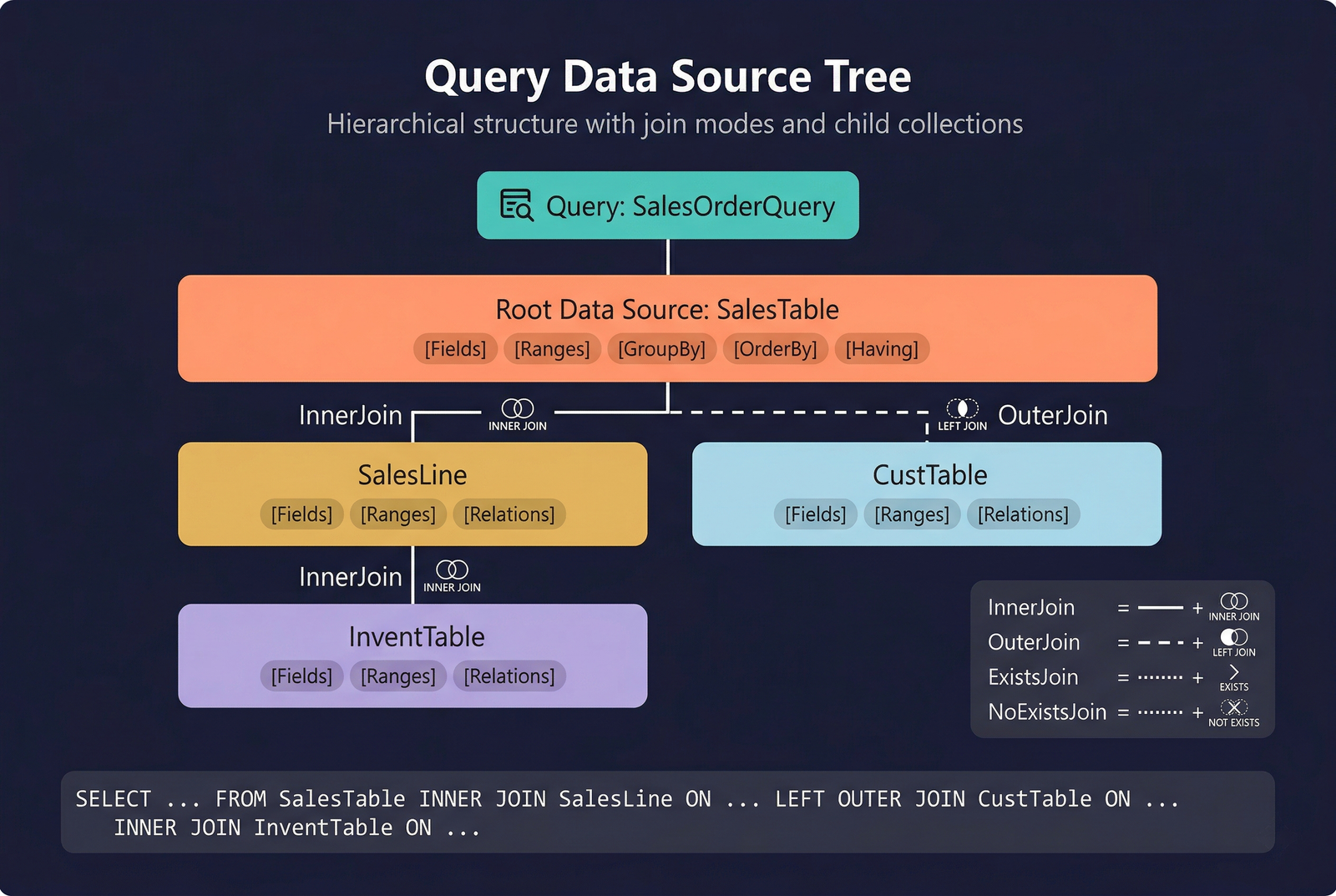
The root data source (AxQuerySimpleRootDataSource) inherits all properties from the shared AxQuerySimpleDataSource base and adds GroupBy, Having, and OrderBy collections. Embedded data sources (AxQuerySimpleEmbeddedDataSource) inherit the same shared base but add JoinMode, FetchMode, UseRelations, and a Relations collection for defining custom join conditions.
Fields
The Fields collection on a data source controls which columns appear in the query result. Each field entry (AxQuerySimpleDataSourceField) references a column from the data source's table.
When DynamicFields is set to Yes on the data source, all fields from the table are included automatically and the Fields collection is ignored. When set to No, only the explicitly listed fields are returned.
Ranges
Ranges define filter conditions on a data source — they become WHERE clauses in the generated SQL. Each range (AxQuerySimpleDataSourceRange) targets a specific field and specifies a filter value.
The Value property supports operators and expressions:
| Expression | Example | SQL Equivalent |
|---|---|---|
| Exact value | 10 | = 10 |
| Range | 1..100 | BETWEEN 1 AND 100 |
| Not equal | !10 | <> 10 |
| Wildcard | Cust* | LIKE 'Cust%' |
| Or list | 10,20,30 | IN (10, 20, 30) |
Range Status
The Status property controls whether end users can modify the range at runtime (in form query dialogs):
| Status | Behaviour |
|---|---|
| Open (0) | The user can see and modify the range value. |
| Locked (1) | The user can see the range but cannot change it. |
| Hidden (2) | The range is invisible to the user and cannot be changed. |
Relations (Embedded Data Sources)
When an embedded data source has UseRelations set to No, the join condition must be defined manually in the Relations collection. Each relation entry (AxQuerySimpleDataSourceRelation) links a field on the child data source to a field on the parent (or another named data source).
When UseRelations is Yes, the runtime uses the relations defined between the tables in the AOT Data Dictionary and the Relations collection is ignored.
Group By, Having, and Order By
These collections are available only on the root data source.
Group By
The GroupBy collection (AxQuerySimpleGroupByField) specifies the fields used to group rows, producing an SQL GROUP BY clause. When grouping is active, non-grouped fields in the query must use an aggregation function (Sum, Count, Min, Max, Avg).
Having
The Having collection (AxQuerySimpleHavingPredicate) filters grouped results — equivalent to a SQL HAVING clause. Having predicates are applied after aggregation, allowing you to filter on aggregate values (e.g., "only groups where SUM(Amount) > 1000").
Order By
The OrderBy collection (AxQuerySimpleOrderByField) defines the sort order of results. Each entry specifies a field and a direction:
| Direction | Behaviour |
|---|---|
| Ascending (0) | Sort A→Z / smallest→largest. |
| Descending (1) | Sort Z→A / largest→smallest. |
Fetch Mode
The FetchMode property on embedded data sources controls how the runtime retrieves records from joined tables:
| Fetch Mode | Behaviour |
|---|---|
| OneToOne (0) | A single record from the child table is fetched alongside each parent record. This is the default and is appropriate for lookup joins. |
| OneToN (1) | Multiple child records are fetched per parent. The data source acts as a nested loop and must be iterated separately in X++ when used on forms. |
In AOT queries consumed by views, FetchMode has no runtime effect because the view is flattened into SQL. It is primarily relevant when the query backs a form data source.
Using a Query in X++
The Query and QueryRun classes provide a programmatic interface to build and execute queries at runtime. You can start from an AOT query or build one entirely in code — adding data sources, ranges, joins, and sort orders dynamically.
When AllowCrossCompany is Yes on the AOT query (or set programmatically), the query retrieves data across all legal entities the user has access to.
See Code Examples for full implementation patterns.
Properties
| Property | Display Name | Type | Description |
|---|---|---|---|
| QueryAxQuerySimple | |||
| QueryType | Query Type | QueryType | Type of query. Values: Join (0), Union (1). |
| Title | Title | String | Title of the query. |
| Description | Description | String | Descriptive help text for the query. |
| Form | Form | String | Form associated with the query. |
| UserUpdate | User Update | NoYes | Whether the user may modify the query. Values: No (0), Yes (1). |
| Literals | Literals | SqlLiteralMode_ITxt | How literals are represented in SQL statements. Values: Default (0), ForceLiterals (1), ForcePlaceholders (2). |
| Interactive | Interactive | NoYes | Whether the query may open dialogs. Values: No (0), Yes (1). |
| AllowCheck | Allow Check | NoYes | Whether security checking occurs before or after the form opens. Values: No (0), Yes (1). |
| Searchable | Searchable | NoYes | Whether query results are searchable. Values: No (0), Yes (1). |
| AllowCrossCompany | Allow Cross Company | NoYes | Whether the query aggregates data across all companies. Values: No (0), Yes (1). |
| Importable | Importable | NoYes | Whether the query is importable. Values: No (0), Yes (1). |
| Data Source — sharedAxQuerySimpleDataSource | |||
| Name | Name | String | The name of the data source. |
| Tags | Tags | String | Tags for this element separated by semicolon. |
| Table | Table | String | The table, view, or data entity that supplies data for this data source. |
| Label | Label | String | Descriptive label for the data source. |
| Company | Company | String | Specific company context for this data source. |
| FirstOnly | First Only | NoYes | Whether only the first record should be selected. Values: No (0), Yes (1). |
| FirstFast | First Fast | NoYes | Whether to retrieve the first record faster than subsequent records. Values: No (0), Yes (1). |
| AllowAdd | Allow Add | NoYes | Whether the user may add fields for search. Values: No (0), Yes (1). |
| Update | Update | NoYes | Whether the cursor can update records. Values: No (0), Yes (1). |
| Enabled | Enabled | NoYes | Whether the data source is enabled. Values: No (0), Yes (1). |
| SelectWithRepeatableRead | Select With Repeatable Read | NoYes | Whether the data source uses a repeatable read hint. Values: No (0), Yes (1). |
| ConcurrencyModel | Concurrency Model | ConcurrencyModel | Concurrency model for the data source. Values: Auto (0), Optimistic (1), Pessimistic (2). |
| UnionType | Union Type | UnionType | Type of union for this data source. Values: None (0), Union (1), UnionAll (2). |
| DynamicFields | Dynamic Fields | QueryFieldListDynamic | Whether fields are dynamically selected. Values: No (0), Yes (1), Unselected (99). |
| PolicyContext | Policy Context | String | Policy context for the data source. |
| IsReadOnly | Is Read Only | NoYes | Whether the data source is read-only. Values: No (0), Yes (1). |
| ApplyDateFilter | Apply Date Filter | NoYes | Whether the data source is filtered for date effectivity. Values: No (0), Yes (1). |
| ValidTimeStateUpdate | Valid Time State Update | ValidTimeStateUpdate | Type of update for date-effective records. Values: CreateNewTimePeriod (1), Correction (2), EffectiveBased (3). |
| ChangeTrackingEnabled | Change Tracking Enabled | NoYes | Whether the data source participates in change tracking. Values: No (0), Yes (1). |
| Root Data SourceAxQuerySimpleRootDataSource | |||
| GroupBy | Group By | Collection | Fields to group by. Contains AxQuerySimpleGroupByField entries. |
| Having | Having | Collection | Having predicates applied after aggregation. Contains AxQuerySimpleHavingPredicate entries. |
| OrderBy | Order By | Collection | Sort order fields. Contains AxQuerySimpleOrderByField entries. |
| Embedded Data SourceAxQuerySimpleEmbeddedDataSource | |||
| JoinMode | Join Mode | JoinMode_ITxt | How the data source joins to its parent. Values: InnerJoin (0), OuterJoin (1), ExistsJoin (2), NoExistsJoin (3). |
| FetchMode | Fetch Mode | FetchMode_ITxt | How linked records are fetched. Values: OneToOne (0), OneToN (1). |
| UseRelations | Use Relations | NoYes | Whether to use AOT-defined relations for the join condition. Values: No (0), Yes (1). |
| Field / Range / Relation / GroupBy / OrderBy | |||
| Name | Name | String | The name of the field entry. |
| Tags | Tags | String | Tags for this element separated by semicolon. |
| Field | Field | String | The field from the data source table to include in the query result. |
| DerivedTable | Derived Table | String | Table used when referencing a field from a derived (table-inheritance) table. |
| Name | Name | String | The name of the range. |
| Tags | Tags | String | Tags for this element separated by semicolon. |
| Field | Field | String | The field to filter on. |
| Value | Value | String | The filter value or expression. |
| Label | Label | String | Descriptive label for the range. |
| Status | Status | RangeStatus | Runtime visibility and editability of the range. Values: Open (0), Locked (1), Hidden (2). |
| Enabled | Enabled | NoYes | Whether the range is active. Values: No (0), Yes (1). |
| DerivedTable | Derived Table | String | Table used when filtering a field from a derived table. |
| Name | Name | String | The name of the relation. |
| Tags | Tags | String | Tags for this element separated by semicolon. |
| JoinDataSource | Join Data Source | String | The data source to join to (by name). |
| Field | Field | String | Field on the current data source. |
| RelatedField | Related Field | String | Field on the joined data source. |
| JoinRelationName | Join Relation Name | String | Name of the AOT relation to use for the join. |
| JoinDerivedTable | Join Derived Table | String | Derived table on the join target side. |
| DerivedTable | Derived Table | String | Derived table on the current data source side. |
| Name | Name | String | The name of the group-by entry. |
| Tags | Tags | String | Tags for this element separated by semicolon. |
| Field | Field | String | The field to group by. |
| DataSource | Data Source | String | The data source containing the field (when grouping by a field on a joined data source). |
| DerivedTable | Derived Table | String | Derived table reference for table-inheritance scenarios. |
| Name | Name | String | The name of the order-by entry. |
| Tags | Tags | String | Tags for this element separated by semicolon. |
| Field | Field | String | The field to sort by. |
| Direction | Direction | OrderByDirection | Sort direction. Values: Ascending (0), Descending (1). |
| DataSource | Data Source | String | The data source containing the field. |
| DerivedTable | Derived Table | String | Derived table reference for table-inheritance scenarios. |