Views
A View in the Application Object Tree (AOT) is a virtual table whose content is defined by a query over one or more underlying tables. Views are compiled into SQL Server views during a database synchronisation, and at runtime they behave like read-only table buffers. You can select from a view with the same X++ select syntax used for tables, but you cannot insert, update, or delete records through it.
Views serve two primary purposes:
- Encapsulating complex query logic — joins, filters, groupings, and computed columns are defined once in the view and reused everywhere.
- Providing a stable read interface — forms, reports, data entities, and other queries consume the view without knowing the underlying join structure. If the underlying tables change, only the view definition needs to be updated.
Once a view is synchronised to the database it produces a standard SQL CREATE VIEW statement. Because the result set is read-only, a view buffer has no insert(), update(), or delete() methods. Think of it as a table record buffer that only supports select operations.
Data Sources
Every view needs at least one data source — the table (or tables) whose columns the view exposes. There are two ways to define data sources:
AOT Query Reference
The Query property on the view can reference a standalone AOT Query object. When set, the view inherits the full query definition — data sources, joins, ranges, and sort orders — from that query. This is useful when the same query logic is shared across multiple consumers (views, forms, reports, data entities).
To use this approach, create (or reuse) a Query object in the AOT, then set the view's Query property to its name. The view's ViewMetadata node is populated automatically from the referenced query.
Queries are covered in detail in the Queries section, which provides a full reference on data sources, ranges, relations, and query structure.
Inline Metadata (Manual Data Sources)
If the view does not reference a standalone query, data sources are defined directly inside the view's ViewMetadata node. This embedded query structure is identical to a standalone query — you add data sources, define joins between them, and set ranges and sort orders — but the definition lives inside the view rather than as a separate AOT object.
Use inline metadata when the query logic is specific to this view and not reused elsewhere.
Joins Between Data Sources
When a view contains multiple data sources, they are joined together using the same join modes available on queries:
| Join Mode | Behaviour |
|---|---|
| InnerJoin | Returns only rows where a match exists in both tables. |
| OuterJoin | Returns all rows from the parent data source; unmatched child rows return null. |
| ExistsJoin | Returns parent rows where at least one child match exists. No child columns are returned. |
| NotExistsJoin | Returns parent rows where no child match exists. |
Building Complex Queries with Layered Views
In raw SQL it is common to nest subqueries — a SELECT inside a FROM or WHERE clause — to solve problems that cannot be expressed with flat joins alone. The D365 query framework does not support subqueries directly, which can make certain requirements seem impossible. Views eliminate this limitation.
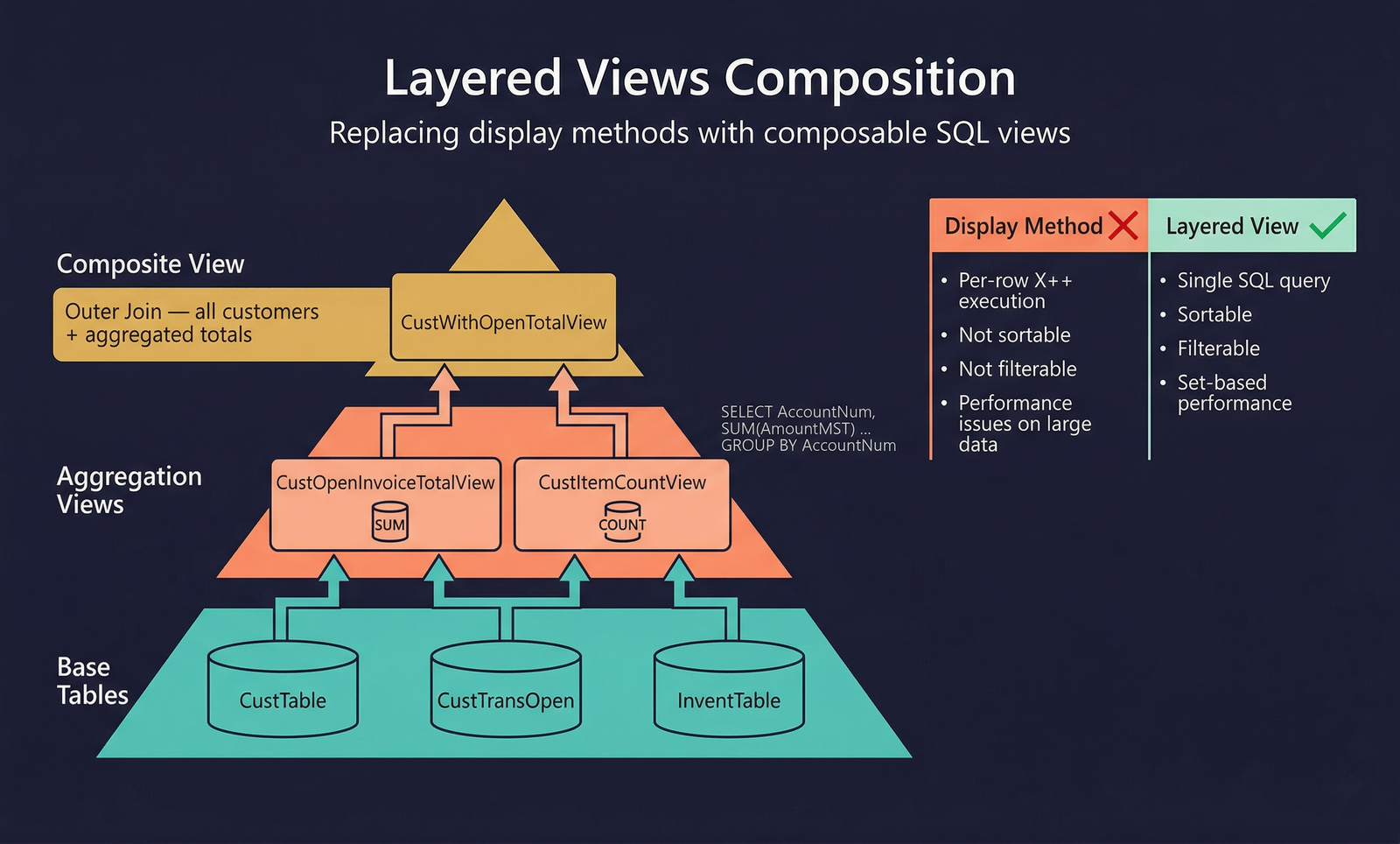
The technique is straightforward: represent each subquery as its own view, then use those views as data sources in a higher-level view. Because a view is materialised as a SQL Server view, the database engine treats it exactly like a table. A view that joins to another view produces the same execution plan as a query with nested subqueries — but the logic is defined entirely within the AOT.
Why This Matters
Consider a common scenario: a form needs to display a calculated value per row — for example, the total open invoice amount per customer. The typical approach is a display method, but display methods execute per-row in X++ — they cannot be sorted or filtered by the user, and on large data sets they cause performance problems.
With layered views, the aggregated total becomes a real SQL column that users can sort, filter, and export. See Code Examples for the full pattern.
Multi-Level Nesting
There is no practical limit to the depth of nesting. A view can reference other views, which in turn reference further views. Each layer adds a subquery in the generated SQL. For example:
FinalView
├── data source: SummaryView (aggregation layer)
│   ├── data source: FilteredView (pre-filtered subset)
│   │   └── data source: BaseTable
│   └── data source: LookupTable
└── data source: AnotherTable
This pattern lets you decompose problems that would require correlated subqueries, HAVING clauses, window functions (via computed columns), or multiple aggregation levels — all within the AOT and without writing raw SQL.
When replacing a display method with a layered view, the form data source changes from a table to a view. Because a view buffer is read-only, ensure the form is either a read-only list page or that editable fields are handled through a separate data source joined to the view.
Bound Fields vs. Computed Fields
Every field on a view is either bound or computed. Understanding the distinction is essential.
Bound Fields
A bound field maps directly to a column in one of the view's data sources. You specify the DataSource (which data source) and DataField (which column on that data source). The value is pulled straight from the underlying table with no transformation.
Bound fields can optionally apply an aggregation function (Sum, Count, Min, Max, Avg) when the view uses grouping. When no aggregation is set, the field passes through the raw value.
Computed Fields
A computed field does not map to a single data source column. Instead, its value is defined by a static method that returns a SQL expression as a string. The string returned by the method becomes the literal SQL that the database engine executes inside the CREATE VIEW statement.
The method must be a server static method that returns str. It receives no runtime data — it constructs a SQL fragment at compile/sync time. The SysComputedColumn class provides a library of helper methods for building these SQL fragments safely.
How It Works
- Create a
staticmethod on the view (or a helper class) that returnsstr. - Set the computed field's ViewMethod property to the method name (if on the view) or Method property to
ClassName::MethodName(if external). - During database synchronisation, the framework calls the method, takes the returned string, and splices it into the
CREATE VIEWSQL as the column expression.
The SysComputedColumn class provides helper methods for building SQL fragments safely (if, concat, cast, isNullValue, aggregation functions, etc.). See Code Examples for implementation patterns and the full helper method reference.
The string returned by a computed column method is injected directly into the SQL view definition. Always use SysComputedColumn helpers and DictView.computedColumnString() to generate column references — never hard-code physical SQL column names.
Computed columns are evaluated at sync time, not at query time. The method runs once during database synchronisation. You cannot use runtime variables, user context, or session state in computed column methods.
Using a View in X++
A view buffer behaves like a read-only table — use standard X++ select syntax including while select, joins, and aggregation. See Code Examples for usage patterns.
Do not call insert(), update(), or delete() on a view buffer. Views are read-only. The compiler will not prevent the call (inherited from Common), but the runtime will throw an error.
Properties
| Property | Display Name | Type | Description |
|---|---|---|---|
| Inherited from AxDataEntity | |||
| Name | Name | String | The name of the element. |
| Label | Label | String | Label containing a user-friendly name of the view. |
| SingularLabel | Singular Label | String | Label used to describe one row in the view. |
| DeveloperDocumentation | Developer Documentation | String | Text explaining the view to developers. |
| FormRef | Form Ref | String | Menu item identifying the form to use when the view is referenced in "Go to table" or "View Details" operations. |
| ListPageRef | List Page Ref | String | Menu item designating the form to use to show lists of records from this view. |
| ReportRef | Report Ref | String | Menu item identifying the report to use when the view is referenced. |
| PreviewPartRef | Preview Part Ref | String | Menu item designating the form to use to display previews of records from this view. |
| TitleField1 | Title Field1 | String | Values of this field are displayed in form titles to identify the current record. |
| TitleField2 | Title Field2 | String | Values of this field are displayed in form titles to identify the current record (secondary). |
| ConfigurationKey | Configuration Key | String | The configuration key assigned to the item. |
| Visible | Visible | NoYes | Determines whether controls bound to the view will be visible on a form. Values: No (0), Yes (1). |
| IsObsolete | Is Obsolete | NoYes | Determines whether the element is deprecated. Values: No (0), Yes (1). |
| Tags | Tags | String | Tags for this element separated by semicolon. |
| TableGroup | Table Group | TableGroup | Select which group the view is part of. Values: Miscellaneous (0), Parameter (1), Group (2), Main (3), Transaction (4), WorksheetHeader (5), WorksheetLine (6), Framework (7), Reference (8), Worksheet (9), TransactionHeader (10), TransactionLine (11), Staging (12). |
| EntityRelationshipType | Entity Relationship Type | EntityRelationshipType | Distinguishes entity views from relationship views. Values: Entity (0), Relationship (1). |
| Visibility | Visibility | CompilerVisibility | Access level visibility for the view. Values: Private (0), Protected (1), Public (2), Internal (3), InternalProtected (4). |
| CountryRegionCodes | Country Region Codes | String | Comma-separated list of ISO country codes where this view is valid. |
| CountryRegionContextField | Country Region Context Field | String | Specifies the field used to identify the country context. |
| OperationalDomain | Operational Domain | OperationalDomain | Operational domain responsible for publishing the data. Values: NotSpecified (0), Shared (1), Company (2), Local (3). |
| SubscriberAccessLevel | Subscriber Access Level | AccessGrant | Maximum access level granted to subscribers of the operational domain. |
| View-specific | |||
| Query | Query | String | AOT Query that defines the view. When set, the view inherits data sources, joins, and ranges from the referenced query. |
| AosAuthorization | AOS Authorization | AosAuthorization | Authorization setting for the view. Values: None (0), CreateDelete (1), UpdateDelete (2), CreateUpdateDelete (3), CreateReadUpdateDelete (4), Read (5). |
| ValidTimeStateEnabled | Valid Time State Enabled | NoYes | Whether the view has valid time state semantics. Values: No (0), Yes (1). |
| Updatable | Updatable | NoYes | Whether the view is updatable. Values: No (0), Yes (1). |
| IsPublic | Is Public | NoYes | Whether the view is publicly accessible. Values: No (0), Yes (1). |
| CollectionName | Collection Name | String | Collection name used in OData and data entity contexts. |
| ReplacementKey | Replacement Key | String | Select the natural key index for the view. |
| IsStaged | Is Staged | NoYes | Whether the view is staged. Values: No (0), Yes (1). |
| Version | Version | String | Version information for the view. |
| MessagingRole | Messaging Role | MessagingRole | Messaging role assigned to the view. Values: None (0), Consumer (1), Subscriber (2), Producer (3), Publisher (4). |